
Map your roles
Your workforce management system uses its own role titles, and these vary between organisations. Role mapping tells Loop IQ which of those titles represent a registered nurse, so RN coverage is identified accurately.
Before you start
Plan: Available on the paid plan, as role mapping applies to Automated reporting only.
- Permissions: You need a role that can manage integration configurations, such as Admin.
- Data source: The facility’s data source must be set to Automated.
Map your roles
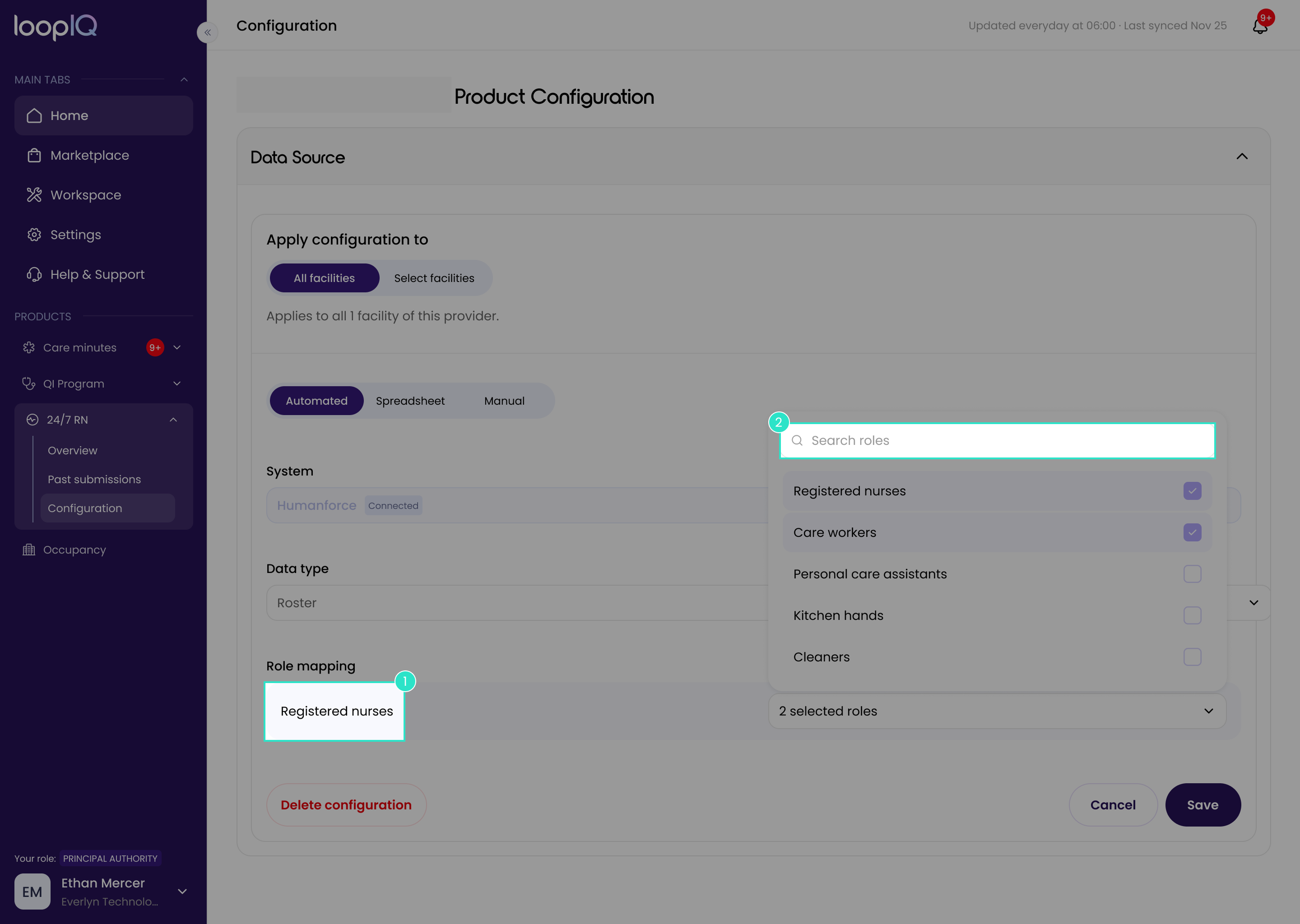
- On the Configuration page, find the Registered nurse row (1).
- Open the dropdown on that row.
- Tick every role that counts as an RN, including any agency roles. Use Search roles (2) for a long list.
- Click Save.
The selected roles will now count towards RN coverage in each month's record.
Important: Unmapped roles do not count towards coverage. Review this list whenever a new role title is added to your workforce management system, as an unmapped RN role will appear in Loop IQ as an absence.
Was this article helpful?
Can't find what you are looking for?
Loop IQ customers - log a support ticket.
Not yet a customer? Email our support team.
 Log a support ticket
 support@loopiq.com.au